> ## Documentation Index
> Fetch the complete documentation index at: https://docs.ditto.live/llms.txt
> Use this file to discover all available pages before exploring further.
# Getting Started
> Ditto offers an HTTP API to programmatically interact with transactional data generated in the mesh network and stored within Ditto Server.
Ditto Server is an optional feature for managing and coordinating data in the peer-to-peer mesh network. For more information, see [Cloud Platform Overview](/cloud/overview).
The HTTP data API is designed following the principles of the remote procedure call (RPC) framework. So, despite the actual exchange occurring over a network, you make requests from Ditto's API methods as if making local calls.
This article provides an overview of the HTTP data API:
## About RPC Framework
The RPC framework is of the request-response category, where a client sends one
message to Ditto Server and receives one response in return.
The HTTP API is structured around various *resources*, which are endpoints you
call in your code to perform specific actions, such as `update`, and receive
corresponding responses from Ditto Server.
These resources correspond to the key elements of the Ditto document model. For more information, see [Document Model](/key-concepts/document-model).
## Cloud URL Endpoint
Use the Ditto HTTP API to integrate external systems with Ditto-backed apps
hosted on `cloud.ditto.live` and programmatically interact with them using an
HTTP server interface.
### Getting your Cloud URL Endpoint
Your app can be deployed to different clusters, so the domain name varies per app. To find your Cloud URL Endpoint:
1. Go to the [Ditto portal](https://portal.ditto.live/) and select your app
2. From the **Connecting via HTTP** group at the bottom of the page, copy your **Cloud URL Endpoint**
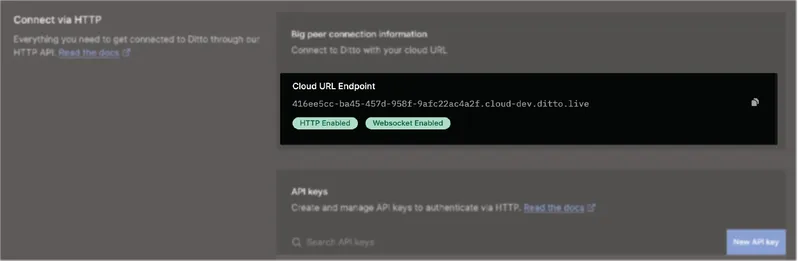 Your Cloud URL Endpoint will look similar to: `6b1b5999.cloud.dittolive.app/f5e954d9-0092-47a0-9a79-2829e767ba7b`
Do not assume a fixed domain like `cloud.ditto.live`. Always use the Cloud URL Endpoint from the portal, as your app may be deployed to a different cluster.
Use this endpoint as the base URL for all HTTP API requests:
```
https://{YOUR_CLOUD_URL_ENDPOINT}/api/v5/store/execute
```
## Swagger Endpoint
To access the HTTP API reference, use the following URL endpoint to view the
OpenAPI swagger.json specification. For more information, see the official
Swagger documentation > OpenAPI Specification.
When accessing the swagger.json specification, replace `{YOUR_CLOUD_URL_ENDPOINT}` with your Cloud URL Endpoint from the portal:
https\://\{YOUR\_CLOUD\_URL\_ENDPOINT}/api/\[v4,v5]/swagger.json
## API v4 vs v5
The HTTP API is available in two versions: v4 and v5. Both versions are fully compatible and share the same endpoints and functionality. The key difference is the default value for `DQL_STRICT_MODE`.
### Key differences
| Feature | v4 API | v5 API |
| --------------------------- | ------------------------------------ | ---------------------------------- |
| `DQL_STRICT_MODE` default | `true` | `false` |
| Nested objects default type | REGISTER (whole object replacement) | MAP (field-level merging) |
| Collection definitions | Required for non-register CRDT types | Only required for register objects |
### Which version should I use?
**Recommendation:** Use the v5 API (`/api/v5/`) for new integrations. The v5 API defaults to `DQL_STRICT_MODE=false`, which provides more intuitive behavior for nested objects and better compatibility with the SDK's default settings.
* **Use v5** when your SDK peers have `DQL_STRICT_MODE=false` (the default in SDK 5.0+)
* **Use v4** when all your SDK peers have `DQL_STRICT_MODE=true` (the default in SDK 4.x)
* Both versions sync data correctly with all SDK versions
For detailed information about strict mode behavior and cross-peer synchronization, see [Strict Mode](/dql/strict-mode).
## Data Representations
Ditto uses UTF-8 to encode data. For more information, see [Encoding Standard: UTF-8](/cloud/http-api/getting-started#encoding-standard-utf-8).
Unless otherwise specified, the default representation format for individual
resources is JSON, as indicated by the `Content‑Type` HTTP header included in
your response:
```none theme={null}
Content-Type: application/json
```
### Encoding Standard: UTF-8
Unless you have a specific requirement for a different encoding, encode your
input data in *UTF-8*. UTF-8 is a variable-length schema for universal character
encoding. For more information, see the official "UTF-8" Wikipedia
article.
Make sure to encode your text-based data, such as JSON, using the UTF-8 encoding.
If using another format to encode, such as UTF-16, decoding errors and invalid results are likely to occur.
### Encoding Formats: Binary Data
To transmit binary data, such as a media file, to Ditto Server, you must first convert it into either of the following formats:
* For smaller data, use a Base64-encoded `string`.
* For larger data, use an `ATTACHMENT` object. (See [HTTP API - Attachments](/cloud/http-api/attachments))
The following table provides an overview of the acceptable encoding formats by binary size:
| **Binary Size** | **Encoding Format** |
| --------------------- | ---------------------------------------------------------------------------------------------------------------------------------------------------------- |
| Below 250 KB | Base64-encoded `string` value |
| Between 250KB and 2MB | `ATTACHMENT` object |
| 2MB and above | This will be rejected as the payload is too large. Please get in contact with Ditto Support to have this limit increased for your deployment if necessary. |
Once converted, include your Base64-encoded `string` in your request.
Failing to send binary data encoded with either Base64 or an `ATTACHMENT`, as appropriate, may result in compatibility issues leading to data corruption or loss.
Your Cloud URL Endpoint will look similar to: `6b1b5999.cloud.dittolive.app/f5e954d9-0092-47a0-9a79-2829e767ba7b`
Do not assume a fixed domain like `cloud.ditto.live`. Always use the Cloud URL Endpoint from the portal, as your app may be deployed to a different cluster.
Use this endpoint as the base URL for all HTTP API requests:
```
https://{YOUR_CLOUD_URL_ENDPOINT}/api/v5/store/execute
```
## Swagger Endpoint
To access the HTTP API reference, use the following URL endpoint to view the
OpenAPI swagger.json specification. For more information, see the official
Swagger documentation > OpenAPI Specification.
When accessing the swagger.json specification, replace `{YOUR_CLOUD_URL_ENDPOINT}` with your Cloud URL Endpoint from the portal:
https\://\{YOUR\_CLOUD\_URL\_ENDPOINT}/api/\[v4,v5]/swagger.json
## API v4 vs v5
The HTTP API is available in two versions: v4 and v5. Both versions are fully compatible and share the same endpoints and functionality. The key difference is the default value for `DQL_STRICT_MODE`.
### Key differences
| Feature | v4 API | v5 API |
| --------------------------- | ------------------------------------ | ---------------------------------- |
| `DQL_STRICT_MODE` default | `true` | `false` |
| Nested objects default type | REGISTER (whole object replacement) | MAP (field-level merging) |
| Collection definitions | Required for non-register CRDT types | Only required for register objects |
### Which version should I use?
**Recommendation:** Use the v5 API (`/api/v5/`) for new integrations. The v5 API defaults to `DQL_STRICT_MODE=false`, which provides more intuitive behavior for nested objects and better compatibility with the SDK's default settings.
* **Use v5** when your SDK peers have `DQL_STRICT_MODE=false` (the default in SDK 5.0+)
* **Use v4** when all your SDK peers have `DQL_STRICT_MODE=true` (the default in SDK 4.x)
* Both versions sync data correctly with all SDK versions
For detailed information about strict mode behavior and cross-peer synchronization, see [Strict Mode](/dql/strict-mode).
## Data Representations
Ditto uses UTF-8 to encode data. For more information, see [Encoding Standard: UTF-8](/cloud/http-api/getting-started#encoding-standard-utf-8).
Unless otherwise specified, the default representation format for individual
resources is JSON, as indicated by the `Content‑Type` HTTP header included in
your response:
```none theme={null}
Content-Type: application/json
```
### Encoding Standard: UTF-8
Unless you have a specific requirement for a different encoding, encode your
input data in *UTF-8*. UTF-8 is a variable-length schema for universal character
encoding. For more information, see the official "UTF-8" Wikipedia
article.
Make sure to encode your text-based data, such as JSON, using the UTF-8 encoding.
If using another format to encode, such as UTF-16, decoding errors and invalid results are likely to occur.
### Encoding Formats: Binary Data
To transmit binary data, such as a media file, to Ditto Server, you must first convert it into either of the following formats:
* For smaller data, use a Base64-encoded `string`.
* For larger data, use an `ATTACHMENT` object. (See [HTTP API - Attachments](/cloud/http-api/attachments))
The following table provides an overview of the acceptable encoding formats by binary size:
| **Binary Size** | **Encoding Format** |
| --------------------- | ---------------------------------------------------------------------------------------------------------------------------------------------------------- |
| Below 250 KB | Base64-encoded `string` value |
| Between 250KB and 2MB | `ATTACHMENT` object |
| 2MB and above | This will be rejected as the payload is too large. Please get in contact with Ditto Support to have this limit increased for your deployment if necessary. |
Once converted, include your Base64-encoded `string` in your request.
Failing to send binary data encoded with either Base64 or an `ATTACHMENT`, as appropriate, may result in compatibility issues leading to data corruption or loss.