> ## Documentation Index
> Fetch the complete documentation index at: https://docs.ditto.live/llms.txt
> Use this file to discover all available pages before exploring further.
# Authentication Providers
> This article provides an introduction to Ditto's methods for server authentication.
Learn more about Ditto's authentication methods in [Authentication and
Authorization](/key-concepts/authentication-and-authorization).
This section will require knowledge of writing HTTP webhooks. This example is
written in JavaScript (NodeJS with an [Express](https://expressjs.com/ "Express")-like API), however you can use any framework or language of your
choosing.
The authentication webhook needs to handle an **HTTP POST** request. Each client
that will need to authenticate will send a payload to this webhook. The
following section requires that you have knowledge of writing server-side HTTP
endpoints and responding with a JSON payload.
## Example Webhook
You can use [this
example](https://github.com/getditto/sample-authentication-permissions/tree/main/server/simple)
webhook to test your application. However, you should use your own webhook in
production. The example simply authenticates all requests for 7 days of offline
usage.
## Building your Authentication Webhook
### Incoming POST body
When your client device wants to authenticate using your webhook, your webhook will receive an HTTP post with a JSON payload that looks like:
```json v1 theme={null}
{
"databaseID": "YOUR_DATABASE_ID_HERE",
"version": "1",
"provider": "my-auth", // this is the "Name" of the "Authentication Webhook"
"token": "eyJhbGciOiJI..." // this is what each device will send to authenticate
}
```
```json legacy theme={null}
{
"appID": "YOUR_APP_ID_HERE", // the databaseID
"provider": "my-auth", // this is the "Name" of the "Authentication Webhook"
"token": "eyJhbGciOiJI..." // this is what each device will send to authenticate
}
```
Your server can introspect these values by parsing out the request body:
```js theme={null}
let express = require('express')
let cors = require('cors')
let body = require('body-parser')
let app = express()
app.use(cors())
app.use(body.json())
let app = express()
app.post('/', (req, res) => {
const databaseID = req.body.databaseID // or appID in legacy
const provider = req.body.provider
const token = req.body.token
})
```
Generally, you will want to check the token for some sort of validity. Let's
assume you have some sort of library or logic to parse and validate the token is
for a specific user. You can also use the clientInfo key in your JSON response
to pass information back to client.
```js v1 theme={null}
app.post('/', async (req, res) => {
const token = req.body.token;
try {
// The token that your webhook receives from ditto is always a string
let parsedToken = JSON.parse(token)
let payload = getDittoPermissions(parsedToken)
res.json(payload)
} catch (err) {
res.json({
"authenticate": err,
"clientInfo": err.message
})
}
})
```
As a simple example, let's grant full read & write permissions to all collections and all documents.
```js JS theme={null}
app.post('/', async (req, res) => {
const token = req.body.token;
try {
let payload = {
"authenticate": true,
"expirationSeconds": 28800,
"version": "1", // for DQL support
"userID": "123abc",
"permissions": {
"read": {
"everything": true,
"queriesByCollection": {}
},
"write": {
"everything": true,
"queriesByCollection": {}
}
}
}
res.json(payload)
} catch (err) {
res.json({
"authenticate": err,
"clientInfo": err.message
})
}
})
```
For more information on how to design your app's permissions, see [Data Authorization](./data-authorization).
### Deploy your webhook
Now, deploy your webhook. The portal will attempt to reach this webhook. That
means you must deploy it somewhere that this HTTP request is accessible.
Please be sure that this endpoint is not behind a firewall or VPN. If you cannot get around this requirement [contact us](https://support.ditto.com).
## Declare your Webhook as Ditto Authentication Provider
To enable Authentication, you need to declare your deployed webhook as a Ditto Authentication Provider through the Ditto Portal.
Open your database in the [portal](https://portal.ditto.live/ "portal") and find
the **Authentication Mode & Webhook Settings** section. Ensure
that **"Authentication"** is turned on:
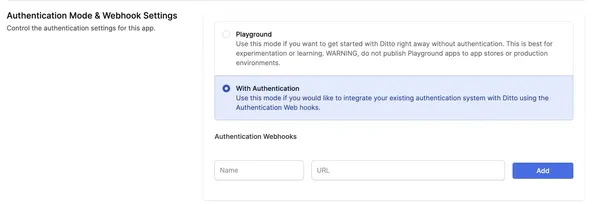 Below, a section called **Authentication Providers** will be editable. Once your
Webhook Endpoint is deployed and ready, you can add **Name** and **URL**.
* **Name**: Provide a unique name for your webhook provider. This name will be used by the Ditto SDK to authenticate clients.
* **URL**: The URL is the fully qualified URL of the webhook that you deploy yourself starting with `https://`.
Once configured, you should see an authentication provider that looks like this in your portal database settings:
Below, a section called **Authentication Providers** will be editable. Once your
Webhook Endpoint is deployed and ready, you can add **Name** and **URL**.
* **Name**: Provide a unique name for your webhook provider. This name will be used by the Ditto SDK to authenticate clients.
* **URL**: The URL is the fully qualified URL of the webhook that you deploy yourself starting with `https://`.
Once configured, you should see an authentication provider that looks like this in your portal database settings:
 ## SDK Authentication
Once you have deployed your webhook and registered it as an authentication provider in the
portal, you can use the Ditto SDK to authenticate your clients.
In v5, authentication is configured using `DittoConfig` to connect to your server, and you set up an `expirationHandler` that is called when authentication credentials are about to expire. Within this handler, you call `ditto.auth.login(token, provider)` to refresh authentication.
Use the `provider` name you set in the portal and the `token` that your
authentication webhook expects. The `token` is typically a JWT or some other
authentication token that your webhook can validate.
```swift Swift theme={null}
// Your Ditto server URL
let providerName = "YOUR_PROVIDER_NAME"
let serverURL = URL(string: "REPLACE_ME_WITH_YOUR_URL")!
let config = DittoConfig(
databaseID: "REPLACE_ME_WITH_YOUR_DATABASE_ID", // This was "appID" in v4
connect: .server(url: serverURL), // This was "Custom Auth URL" in v4
)
let ditto = try await Ditto.open(config: config)
// Set up authentication expiration handler (required for server connections)
ditto.auth?.expirationHandler = { [weak self] ditto, secondsRemaining in
// Get token from your authentication system
let token = await getMyToken()
ditto.auth?.login(
token: token,
provider: providerName
) { clientInfo, error in
if let error = error {
print("Authentication failed: \(error)")
} else {
print("Authentication successful")
}
}
}
try ditto.sync.start()
```
```typescript JavaScript theme={null}
// Your Ditto server URL
const endpoint = 'REPLACE_ME_WITH_YOUR_URL';
const databaseId = 'REPLACE_ME_WITH_YOUR_DATABASE_ID';
const providerName = 'YOUR_PROVIDER_NAME';
const config = new DittoConfig(
databaseId, // This was "appID" in v4
{
type: 'server',
url: endpoint
}
);
const ditto = await Ditto.open(config);
// Set up authentication expiration handler (required for server connections)
await ditto.auth.setExpirationHandler(async (ditto, secondsRemaining) => {
// Authenticate when token is expiring
try {
// Get token from your authentication system
const token = await getMyToken();
await ditto.auth.login(
token,
providerName
);
console.log('Authentication successful');
} catch (error) {
console.error('Authentication failed:', error);
}
});
ditto.startSync();
```
```kotlin Kotlin theme={null}
// Your Ditto server URL
val endpoint = "REPLACE_ME_WITH_YOUR_URL"
val id = "REPLACE_ME_WITH_YOUR_DATABASE_ID"
val providerName = "YOUR_PROVIDER_NAME"
val config = DittoAndroidConfig(
context,
databaseId = id, // This was "appID" in v4
connect = DittoConfigConnect.Server(url = URL(endpoint))
)
val ditto = Ditto.open(config)
// Set up authentication expiration handler (required for server connections)
ditto.auth.expirationHandler = { ditto, secondsRemaining ->
// Authenticate when token is expiring
// Get token from your authentication system
val token = getMyToken()
ditto.auth.login(
token = token,
provider = providerName
) { clientInfo, error ->
if (error != null) {
println("Authentication failed: $error")
} else {
println("Authentication successful")
}
}
}
ditto.startSync()
```
```java Java theme={null}
// Your Ditto server URL
String endpoint = "REPLACE_ME_WITH_YOUR_URL";
String id = "REPLACE_ME_WITH_YOUR_DATABASE_ID";
String providerName = "YOUR_PROVIDER_NAME";
DittoAndroidConfig config = new DittoAndroidConfig(
context,
id, // This was "appID" in v4
new DittoConfigConnect.Server(new URL(endpoint))
);
Ditto ditto = Ditto.open(config);
// Set up authentication expiration handler (required for server connections)
ditto.getAuth().setExpirationHandler((dit, secondsRemaining) -> {
// Authenticate when token is expiring
// Get token from your authentication system
String token = getMyToken();
dit.getAuth().login(
token,
providerName,
(clientInfo, error) -> {
if (error != null) {
System.out.println("Authentication failed: " + error);
} else {
System.out.println("Authentication successful");
}
}
);
});
ditto.startSync();
```
```csharp C# theme={null}
// Your Ditto server URL
var endpoint = "REPLACE_ME_WITH_YOUR_URL";
var id = "REPLACE_ME_WITH_YOUR_DATABASE_ID";
var providerName = "YOUR_PROVIDER_NAME";
var config = new DittoConfig(
databaseId: id, // This was "appID" in v4
connect: new DittoConfigConnect.Server(new Uri(endpoint))
);
var ditto = await Ditto.OpenAsync(config);
// Set up authentication expiration handler (required for server connections)
ditto.Auth.ExpirationHandler = async (ditto, secondsRemaining) =>
{
// Authenticate when token is expiring
try
{
// Get token from your authentication system
var token = await GetMyTokenAsync();
await ditto.Auth.LoginAsync(
token,
providerName
);
Console.WriteLine("Authentication successful");
}
catch (Exception error)
{
Console.WriteLine($"Authentication failed: {error}");
}
};
ditto.Sync.Start();
```
```cpp C++ theme={null}
// Your Ditto server URL
std::string endpoint = "REPLACE_ME_WITH_YOUR_URL";
std::string id = "REPLACE_ME_WITH_YOUR_DATABASE_ID";
std::string provider_name = "YOUR_PROVIDER_NAME";
auto config = DittoConfig::default_config()
.set_database_id(id) // This was "appID" in v4
.set_connect(DittoConfig::Connect::server(endpoint));
auto ditto = Ditto::open(config);
// Set up authentication expiration handler (required for server connections)
ditto->auth().set_expiration_handler([provider_name](auto& ditto, int64_t seconds_remaining) {
// Authenticate when token is expiring
// Get token from your authentication system
std::string token = getMyToken();
ditto.auth().login(
token,
provider_name,
[](auto client_info, auto error) {
if (error) {
std::cout << "Authentication failed: " << error->message() << std::endl;
} else {
std::cout << "Authentication successful" << std::endl;
}
}
);
});
ditto->start_sync();
```
```rust Rust theme={null}
// Your Ditto server URL
let endpoint = "REPLACE_ME_WITH_YOUR_URL";
let id = "REPLACE_ME_WITH_YOUR_DATABASE_ID";
let provider_name = "YOUR_PROVIDER_NAME";
// Create config with server connection
let config = DittoConfig::default()
.database_id(id) // This was "app_id" in v4
.connect(Connect::Server {
url: endpoint.to_string(),
});
// Initialize Ditto
let ditto = Ditto::open(config)?;
// Set up authentication expiration handler (required for server connections)
ditto.auth().set_expiration_handler(move |ditto, seconds_remaining| {
// Authenticate when token is expiring
// Get token from your authentication system
let token = get_my_token();
ditto.auth().login(
&token,
provider_name,
|client_info, error| {
match error {
Some(e) => println!("Authentication failed: {}", e),
None => println!("Authentication successful"),
}
},
);
});
ditto.start_sync()?;
```
```dart Flutter theme={null}
// ⚠️ Flutter SDK does not yet support the new DittoConfig-based initialization.
// Continue using the legacy DittoIdentity-based API for Flutter applications.
```
## SDK Authentication
Once you have deployed your webhook and registered it as an authentication provider in the
portal, you can use the Ditto SDK to authenticate your clients.
In v5, authentication is configured using `DittoConfig` to connect to your server, and you set up an `expirationHandler` that is called when authentication credentials are about to expire. Within this handler, you call `ditto.auth.login(token, provider)` to refresh authentication.
Use the `provider` name you set in the portal and the `token` that your
authentication webhook expects. The `token` is typically a JWT or some other
authentication token that your webhook can validate.
```swift Swift theme={null}
// Your Ditto server URL
let providerName = "YOUR_PROVIDER_NAME"
let serverURL = URL(string: "REPLACE_ME_WITH_YOUR_URL")!
let config = DittoConfig(
databaseID: "REPLACE_ME_WITH_YOUR_DATABASE_ID", // This was "appID" in v4
connect: .server(url: serverURL), // This was "Custom Auth URL" in v4
)
let ditto = try await Ditto.open(config: config)
// Set up authentication expiration handler (required for server connections)
ditto.auth?.expirationHandler = { [weak self] ditto, secondsRemaining in
// Get token from your authentication system
let token = await getMyToken()
ditto.auth?.login(
token: token,
provider: providerName
) { clientInfo, error in
if let error = error {
print("Authentication failed: \(error)")
} else {
print("Authentication successful")
}
}
}
try ditto.sync.start()
```
```typescript JavaScript theme={null}
// Your Ditto server URL
const endpoint = 'REPLACE_ME_WITH_YOUR_URL';
const databaseId = 'REPLACE_ME_WITH_YOUR_DATABASE_ID';
const providerName = 'YOUR_PROVIDER_NAME';
const config = new DittoConfig(
databaseId, // This was "appID" in v4
{
type: 'server',
url: endpoint
}
);
const ditto = await Ditto.open(config);
// Set up authentication expiration handler (required for server connections)
await ditto.auth.setExpirationHandler(async (ditto, secondsRemaining) => {
// Authenticate when token is expiring
try {
// Get token from your authentication system
const token = await getMyToken();
await ditto.auth.login(
token,
providerName
);
console.log('Authentication successful');
} catch (error) {
console.error('Authentication failed:', error);
}
});
ditto.startSync();
```
```kotlin Kotlin theme={null}
// Your Ditto server URL
val endpoint = "REPLACE_ME_WITH_YOUR_URL"
val id = "REPLACE_ME_WITH_YOUR_DATABASE_ID"
val providerName = "YOUR_PROVIDER_NAME"
val config = DittoAndroidConfig(
context,
databaseId = id, // This was "appID" in v4
connect = DittoConfigConnect.Server(url = URL(endpoint))
)
val ditto = Ditto.open(config)
// Set up authentication expiration handler (required for server connections)
ditto.auth.expirationHandler = { ditto, secondsRemaining ->
// Authenticate when token is expiring
// Get token from your authentication system
val token = getMyToken()
ditto.auth.login(
token = token,
provider = providerName
) { clientInfo, error ->
if (error != null) {
println("Authentication failed: $error")
} else {
println("Authentication successful")
}
}
}
ditto.startSync()
```
```java Java theme={null}
// Your Ditto server URL
String endpoint = "REPLACE_ME_WITH_YOUR_URL";
String id = "REPLACE_ME_WITH_YOUR_DATABASE_ID";
String providerName = "YOUR_PROVIDER_NAME";
DittoAndroidConfig config = new DittoAndroidConfig(
context,
id, // This was "appID" in v4
new DittoConfigConnect.Server(new URL(endpoint))
);
Ditto ditto = Ditto.open(config);
// Set up authentication expiration handler (required for server connections)
ditto.getAuth().setExpirationHandler((dit, secondsRemaining) -> {
// Authenticate when token is expiring
// Get token from your authentication system
String token = getMyToken();
dit.getAuth().login(
token,
providerName,
(clientInfo, error) -> {
if (error != null) {
System.out.println("Authentication failed: " + error);
} else {
System.out.println("Authentication successful");
}
}
);
});
ditto.startSync();
```
```csharp C# theme={null}
// Your Ditto server URL
var endpoint = "REPLACE_ME_WITH_YOUR_URL";
var id = "REPLACE_ME_WITH_YOUR_DATABASE_ID";
var providerName = "YOUR_PROVIDER_NAME";
var config = new DittoConfig(
databaseId: id, // This was "appID" in v4
connect: new DittoConfigConnect.Server(new Uri(endpoint))
);
var ditto = await Ditto.OpenAsync(config);
// Set up authentication expiration handler (required for server connections)
ditto.Auth.ExpirationHandler = async (ditto, secondsRemaining) =>
{
// Authenticate when token is expiring
try
{
// Get token from your authentication system
var token = await GetMyTokenAsync();
await ditto.Auth.LoginAsync(
token,
providerName
);
Console.WriteLine("Authentication successful");
}
catch (Exception error)
{
Console.WriteLine($"Authentication failed: {error}");
}
};
ditto.Sync.Start();
```
```cpp C++ theme={null}
// Your Ditto server URL
std::string endpoint = "REPLACE_ME_WITH_YOUR_URL";
std::string id = "REPLACE_ME_WITH_YOUR_DATABASE_ID";
std::string provider_name = "YOUR_PROVIDER_NAME";
auto config = DittoConfig::default_config()
.set_database_id(id) // This was "appID" in v4
.set_connect(DittoConfig::Connect::server(endpoint));
auto ditto = Ditto::open(config);
// Set up authentication expiration handler (required for server connections)
ditto->auth().set_expiration_handler([provider_name](auto& ditto, int64_t seconds_remaining) {
// Authenticate when token is expiring
// Get token from your authentication system
std::string token = getMyToken();
ditto.auth().login(
token,
provider_name,
[](auto client_info, auto error) {
if (error) {
std::cout << "Authentication failed: " << error->message() << std::endl;
} else {
std::cout << "Authentication successful" << std::endl;
}
}
);
});
ditto->start_sync();
```
```rust Rust theme={null}
// Your Ditto server URL
let endpoint = "REPLACE_ME_WITH_YOUR_URL";
let id = "REPLACE_ME_WITH_YOUR_DATABASE_ID";
let provider_name = "YOUR_PROVIDER_NAME";
// Create config with server connection
let config = DittoConfig::default()
.database_id(id) // This was "app_id" in v4
.connect(Connect::Server {
url: endpoint.to_string(),
});
// Initialize Ditto
let ditto = Ditto::open(config)?;
// Set up authentication expiration handler (required for server connections)
ditto.auth().set_expiration_handler(move |ditto, seconds_remaining| {
// Authenticate when token is expiring
// Get token from your authentication system
let token = get_my_token();
ditto.auth().login(
&token,
provider_name,
|client_info, error| {
match error {
Some(e) => println!("Authentication failed: {}", e),
None => println!("Authentication successful"),
}
},
);
});
ditto.start_sync()?;
```
```dart Flutter theme={null}
// ⚠️ Flutter SDK does not yet support the new DittoConfig-based initialization.
// Continue using the legacy DittoIdentity-based API for Flutter applications.
```