> ## Documentation Index
> Fetch the complete documentation index at: https://docs.ditto.live/llms.txt
> Use this file to discover all available pages before exploring further.
# Limiting Connections
> Ditto provides mechanisms to control who you sync with, such as sync groups and the `connectionRequestHandler` API method. This article provides guidance on how to use these mechanisms to manage which devices sync with each other, even within the same App.
## Connection Request Handler
Using the `connectionRequestHandler` API method, you can intercept new peer connections and make decisions to accept or reject them based on the peer metadata set for a given device. (See [Setting the Connection Request Handler](#setting-the-connection-request-handler))
Within the `connectionRequestHandler` you can use the `connectionRequest` parameter to access information about the peer connection request. (See [Reading Connection Parameters](#reading-connection-parameters))
* Peer key string — The identifier encoded as a `string` that uniquely identifies the requesting peer once discovered within the mesh.
* Connection type — The type of connection the peer is requesting.
* Peer metadata — The information provided by the end user associated with the peer making the request. (For more information on peer metadata, see [Using Mesh Presence](./using-mesh-presence))
The `connectionRequestHandler` is triggered for both outbound and inbound connections on the device after the connection handshake is established.
You can update the `connectionRequestHandler` without stopping and restarting sync. The version of the handler that was set before the connection handshake started is the one used to validate the request.
### Setting the Connection Request Handler
To accept or reject an incoming connection request:
Once you've set the request handler, end users must always make a choice to accept or reject incoming connection requests; otherwise, potential issues like request deadlocks and connection timeouts may result.
```swift Swift theme={null}
ditto.presence.connectionRequestHandler = { connectionRequest in
if (true) {
return .allow
} else {
return .deny
}
}
```
```kotlin Kotlin theme={null}
ditto.presence.connectionRequestHandler = { connectionRequest ->
if (true) {
DittoConnectionRequestAuthorization.Allow
} else {
DittoConnectionRequestAuthorization.Deny
}
}
```
```javascript JS theme={null}
ditto.presence.connectionRequestHandler = async (connectionRequest) => {
if (true) {
return "allow";
} else {
return "deny";
}
}
```
```typescript TS theme={null}
import { Ditto, ConnectionRequest, ConnectionRequestAuthorization } from '@dittolive/ditto'
ditto.presence.connectionRequestHandler = async (
connectionRequest: ConnectionRequest
): Promise => {
if (true) {
return "allow"
} else {
return "deny"
}
}
```
```java Java theme={null}
// Not Supported
```
```csharp C# theme={null}
ditto.Presence.ConnectionRequestHandler = (connectionRequest) =>
{
if (true) {
return Task.FromResult(DittoConnectionRequestAuthorization.Allow);
} else {
return Task.FromResult(DittoConnectionRequestAuthorization.Deny);
}
};
```
```cpp C++ theme={null}
ditto.get_presence().set_connection_request_handler(
[&](ConnectionRequest connection_request) {
if (true){
return ConnectionRequestAuthorization::allow;
} else {
return ConnectionRequestAuthorization::deny;
}
}
);
```
```rust Rust theme={null}
ditto.presence().set_connection_request_handler(|connection_request: ConnectionRequest| {
if (true) {
return ConnectionRequestAuthorization::Allow
} else {
return ConnectionRequestAuthorization::Deny
}
});
```
```dart Dart theme={null}
ditto.presence.connectionRequestHandler = (request) async {
if (true) {
return ConnectionRequestAuthorization.allow;
} else {
return ConnectionRequestAuthorization.deny;
}
};
```
### Reading Connection Parameters
To see specific information associated with a requesting peer connection
```swift Swift theme={null}
ditto.presence.connectionRequestHandler = { connectionRequest in
print(connectionRequest.peerKeyString)
print(connectionRequest.connectionType)
print(connectionRequest.peerMetadata)
return .allow
}
```
```kotlin Kotlin theme={null}
ditto.presence.connectionRequestHandler = { connectionRequest ->
println(connectionRequest.peerKeyString)
println(connectionRequest.connectionType)
println(connectionRequest.peerMetadata)
DittoConnectionRequestAuthorization.Allow
}
```
```javascript JS theme={null}
ditto.presence.connectionRequestHandler = async (connectionRequest) => {
console.log(connectionRequest.peerKeyString)
console.log(connectionRequest.connectionType)
console.log(connectionRequest.peerMetadata)
return "allow";
}
```
```typescript TS theme={null}
import { Ditto, ConnectionRequest, ConnectionRequestAuthorization } from '@dittolive/ditto'
ditto.presence.connectionRequestHandler = async (
connectionRequest: ConnectionRequest
): Promise => {
const peerKeyString: string = connectionRequest.peerKeyString
const connectionType: string = connectionRequest.connectionType
const peerMetadata: Record = connectionRequest.peerMetadata
console.log(peerKeyString)
console.log(connectionType)
console.log(peerMetadata)
return "allow"
}
```
```java Java theme={null}
// Not Supported
```
```csharp C# theme={null}
ditto.Presence.ConnectionRequestHandler = (connectionRequest) =>
{
Console.WriteLine(connectionRequest.PeerKey);
Console.WriteLine(connectionRequest.ConnectionType);
Console.WriteLine(connectionRequest.PeerMetadata);
return Task.FromResult(DittoConnectionRequestAuthorization.Allow);
};
```
```cpp C++ theme={null}
ditto.get_presence().set_connection_request_handler(
[&](ConnectionRequest connection_request) {
std::cout << connection_request.peer_key_string << std::endl;
std::cout << connection_request.connection_type << std::endl;
std::cout << connection_request.peer_metadata << std::endl;
return ConnectionRequestAuthorization::allow;
}
);
```
```rust Rust theme={null}
ditto.presence().set_connection_request_handler(|connection_request: ConnectionRequest| {
println!("{}", connection_request.peer_key());
println!("{:?}", connection_request.connection_type());
println!("{:?}", connection_request.peer_metadata());
ConnectionRequestAuthorization::Allow
});
```
```dart Dart theme={null}
ditto.presence.connectionRequestHandler = (request) async {
print(connectionRequest.peerKeyString)
print(connectionRequest.connectionType)
print(connectionRequest.peerMetadata)
return ConnectionRequestAuthorization.allow;
};
```
```go Go theme={null}
dit.Presence().SetConnectionRequestHandler(func (request *ditto.ConnectionRequest) {
log.Printf("%v\n", request.PeerKey)
log.Printf("%v\n", request.PeerMetadata)
return ditto.ConnectionRequestAuthorizationAllow
})
```
## Sync Groups
By default, devices with the same app ID automatically form a mesh network to connect. However, you can streamline sync processes, minimize unnecessary data transfer, and optimize resource usage by configuring sync groups within your app.
For example, the following graphic illustrates two distinct restaurants identified by their location IDs: `7890` and `1234`. When a peer establishes its identity with Ditto Server, it includes its location ID as part of the authentication callback.
Now, the two groups maintain isolated mesh networks:
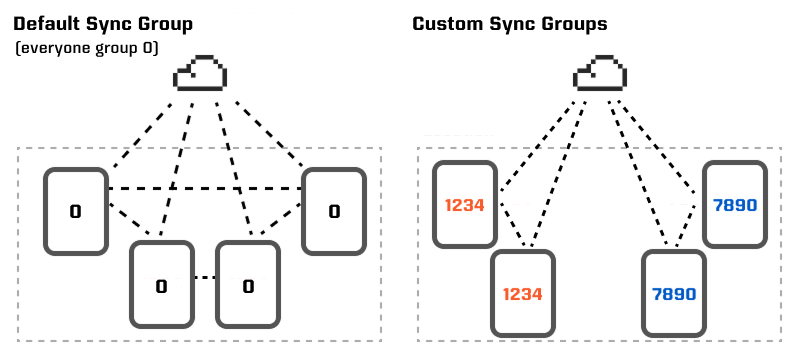 A sync group is a collection of devices organized into a distinct group, allowing you to limit connections to specific subsets of devices rather than the default behavior of connecting all devices sharing the same app ID.
### Access Controls by Group
Sync groups are an optimization, not a security control — if a connection is created manually, such as by specifying a specific peer to connect to, then devices from different sync groups will still connect and sync as normal.
To enforce access controls by group, for instance, two groups of devices, each accessing different datasets, use Ditto's permissions system. (See [Data Authorization](../auth-and-authorization/data-authorization))
A device can only be in one sync group, which by default is group 0. Up to 2^32 distinct group numbers can be used in an app.
### Setting Up Sync Groups
To create a sync group:
```swift Swift theme={null}
ditto.transportConfig.global.syncGroup = 1234
do {
try ditto.sync.start()
} catch (let error) {
print(error.localizedDescription)
}
```
```kotlin Kotlin theme={null}
ditto.updateTransportConfig { config ->
config.global.syncGroup = 1234U
}
ditto.sync.start()
```
```javascript JS theme={null}
const config = new TransportConfig()
config.global.syncGroup = 1234
ditto.setTransportConfig(config)
ditto.startSync()
```
```typescript TS theme={null}
import { Ditto, TransportConfig } from '@dittolive/ditto'
const config: TransportConfig = new TransportConfig()
config.global.syncGroup = 1234
ditto.setTransportConfig(config)
ditto.startSync()
```
```java Java theme={null}
// Not supported
```
```csharp C# theme={null}
ditto.UpdateTransportConfig(config =>
{
config.Global.SyncGroup = 1234;
});
ditto.Sync.Start();
```
```cpp C++ theme={null}
auto config = ditto::TransportConfig();
config.global.sync_group = 1234;
ditto.set_transport_config(config);
ditto.get_sync().start();
```
```rust Rust theme={null}
let mut config = TransportConfig::new();
config.global.sync_group = 1234;
ditto.set_transport_config(config);
ditto.sync().start()?;
```
```dart Dart theme={null}
final config = TransportConfig()
..global.syncGroup = 1234;
ditto.transportConfig = config;
ditto.startSync();
```
A sync group is a collection of devices organized into a distinct group, allowing you to limit connections to specific subsets of devices rather than the default behavior of connecting all devices sharing the same app ID.
### Access Controls by Group
Sync groups are an optimization, not a security control — if a connection is created manually, such as by specifying a specific peer to connect to, then devices from different sync groups will still connect and sync as normal.
To enforce access controls by group, for instance, two groups of devices, each accessing different datasets, use Ditto's permissions system. (See [Data Authorization](../auth-and-authorization/data-authorization))
A device can only be in one sync group, which by default is group 0. Up to 2^32 distinct group numbers can be used in an app.
### Setting Up Sync Groups
To create a sync group:
```swift Swift theme={null}
ditto.transportConfig.global.syncGroup = 1234
do {
try ditto.sync.start()
} catch (let error) {
print(error.localizedDescription)
}
```
```kotlin Kotlin theme={null}
ditto.updateTransportConfig { config ->
config.global.syncGroup = 1234U
}
ditto.sync.start()
```
```javascript JS theme={null}
const config = new TransportConfig()
config.global.syncGroup = 1234
ditto.setTransportConfig(config)
ditto.startSync()
```
```typescript TS theme={null}
import { Ditto, TransportConfig } from '@dittolive/ditto'
const config: TransportConfig = new TransportConfig()
config.global.syncGroup = 1234
ditto.setTransportConfig(config)
ditto.startSync()
```
```java Java theme={null}
// Not supported
```
```csharp C# theme={null}
ditto.UpdateTransportConfig(config =>
{
config.Global.SyncGroup = 1234;
});
ditto.Sync.Start();
```
```cpp C++ theme={null}
auto config = ditto::TransportConfig();
config.global.sync_group = 1234;
ditto.set_transport_config(config);
ditto.get_sync().start();
```
```rust Rust theme={null}
let mut config = TransportConfig::new();
config.global.sync_group = 1234;
ditto.set_transport_config(config);
ditto.sync().start()?;
```
```dart Dart theme={null}
final config = TransportConfig()
..global.syncGroup = 1234;
ditto.transportConfig = config;
ditto.startSync();
```