

Databases
In Ditto, a database is a grouping of collections. All databases that embed the Ditto SDK and share the same database ID will automatically form a mesh network and synchronize data with each other, either directly or via Ditto Server. Devices configured with different database IDs never sync with each other. A database ID functions like a tenant: data, configurations, and peer-to-peer connections are isolated to peers that share that ID. To keep data separate between projects, customers, or environments, issue a distinct database ID for each one from the Ditto portal. See Creating a New Database for how to create and manage database IDs.Collections
Ditto stores documents in collections. Collections are analogous to tables in relational databases. Collections allow you to group similar documents together within the same namespace.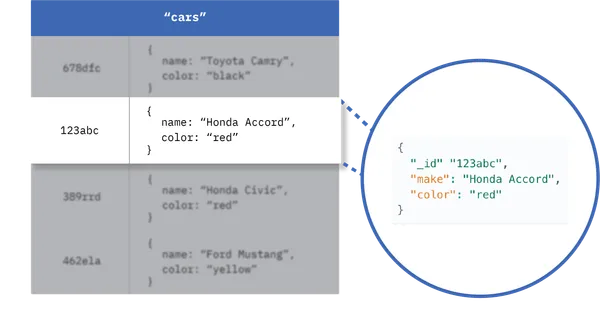
Structuring Collections
While it is good practice for documents within a collection to share a similar structure — for instance, all car-related documents stored in thecars collection contain fields 'make', 'model', and 'year' — structural uniformity is not mandatory.
There is no limit to the number of collections you can have in your data model, so create as many collections as you need.
Managing Collections
Every document must be associated with a collection, even if only one document exists within that collection. There are no explicit steps to manage collections; Ditto implicitly creates collections when you first store data for that collection.Querying Collections
When querying, database interactions occur with collections rather than individual documents. For instance, the query below searches the entirecars collection once executed.